Right-click, draw down, open anything in Obsidian
Right-click, draw down, open anything in Obsidian
I close tabs in Obsidian the way I do in my browser: hold the right button, draw a line, let go. Snailkit already does that. Then I noticed what I do right after: open another note, or jot down a task. So now a line down opens a small window with exactly that.

What’s in it
- A field. Type a few letters to open a note. If it doesn’t exist yet, Enter creates it, and you choose where it goes.
- Your open tabs, most recent first, each with the color of its part of the vault.
- Brainstorms still in progress, with what waits in them: “2 to sort”, “1 to decide”.
- One click for a new brainstorm, task or note, or to jump to Home, Tasks or Brainstorms.
- The keyboard works too: arrows, Enter, Ctrl+Enter for a new tab.
Twelve gestures, and your own
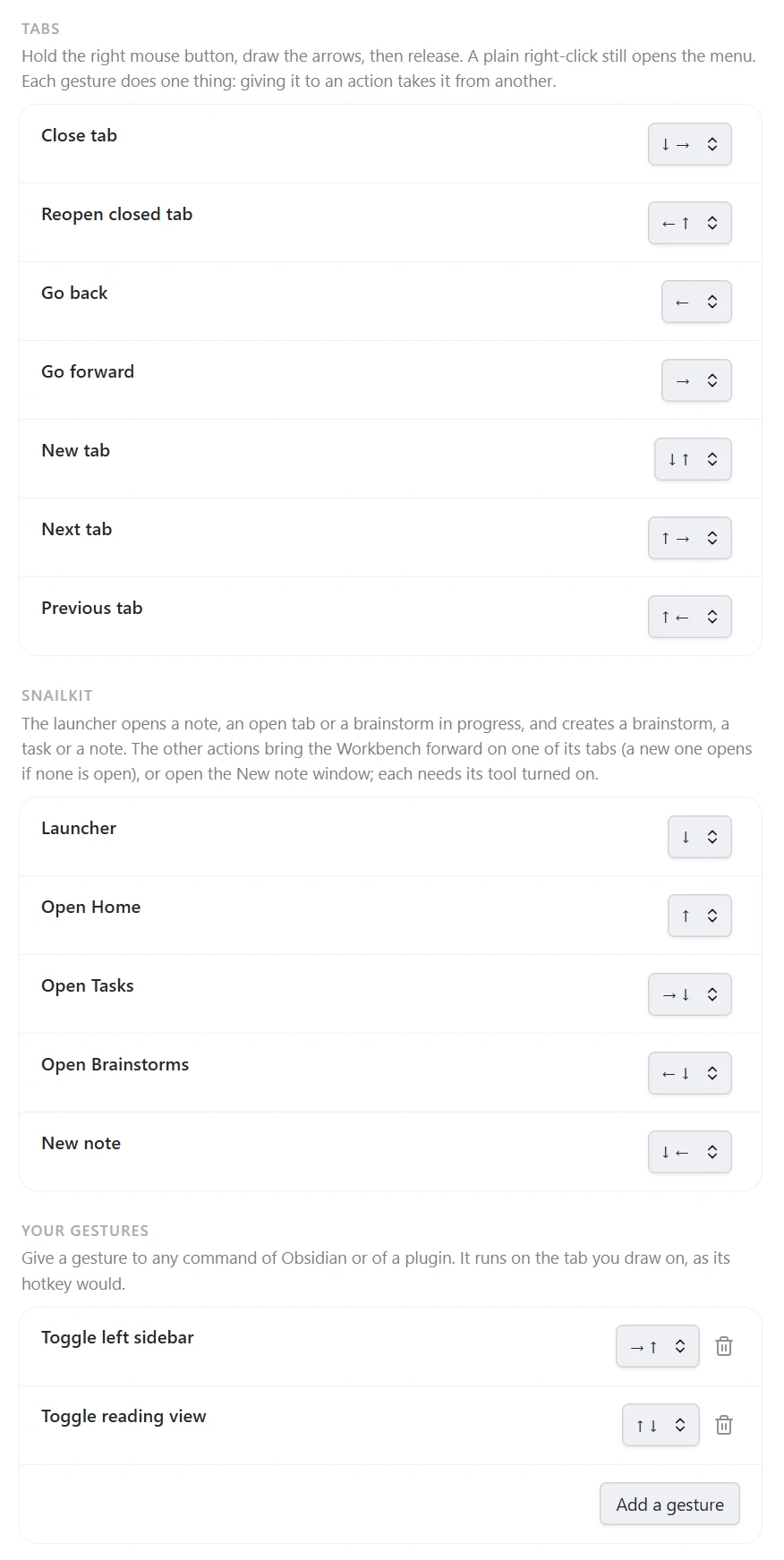
Down is only the default. Each action takes a gesture of one or two strokes, sixteen to choose from, or none: close a tab, bring it back, go back or forward, switch tabs, open Home, Tasks or Brainstorms, write a new note.
And if that’s not enough, Add a gesture gives one to any command, from Obsidian or from another plugin. Below, one folds the sidebar and another switches to reading view. Pick a gesture that’s already taken and the menu tells you by whom, so nothing loses its gesture by surprise.
Why it moves like that
My first version was a plain file picker. It worked, and it was boring. A window I open all day should be nice to open. So it springs out of the end of your line, the rows drop in one after the other, and the highlight takes the color of each note’s area.
As always, I vibe coded it with Claude Code, and Codex reviewed it.
Try it
Install Snailkit from Settings → Community plugins → Browse. Mouse gestures is on in new installs; otherwise turn it on in Settings → Snailkit. Over a note, hold the right mouse button, draw down, release.
It needs a mouse, so it’s for the desktop. Prefer a shortcut? Give one to the command Open the launcher.